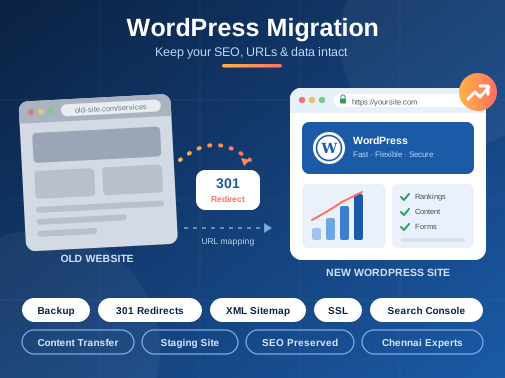

A website migration is more than moving pages from one platform to another. It involves protecting the search visibility, customer experience, and valuable information your business has built over time. Working with the best WordPress development in Chennai can help businesses move to WordPress with a clear plan for preserving existing content, URLs, and essential website functions. When migration is handled carefully, the new website can offer greater flexibility without unnecessarily disrupting the progress made by the old one.
Why Businesses Are Moving Their Websites to WordPress
As businesses expand, their websites often need features that the original platform cannot easily support. Updating content may become complicated, adding new services may require technical assistance, and integrating marketing tools can involve additional work.
WordPress offers a flexible content management system that allows businesses to manage pages, publish articles, organize media, and extend website functionality through suitable themes and plugins. It can support corporate websites, service-based businesses, blogs, and online stores.
However, moving to WordPress should not be treated as a simple design change. A successful migration begins with understanding what already works and identifying what needs improvement. This makes it easier to build a website that supports current business requirements without overlooking important elements of the existing site.
Planning the Migration Before Moving Website Data
Preparation helps prevent avoidable problems during migration. Before transferring files or rebuilding pages, developers should review the existing website and document its important components.
This assessment typically includes the following:
- Content inventory: Identify important pages, blog posts, images, downloadable files, and existing landing pages.
- URL documentation: Record current page addresses and identify URLs that should remain unchanged.
- Functionality review: Check contact forms, payment systems, booking features, customer accounts, and third-party integrations.
- SEO assessment: Record existing metadata, indexed pages, internal links, and important organic landing pages.
- Backup preparation: Create a reliable copy of the website files and database before making changes.
These checks establish a reference point for the new website. They also help developers recognise which elements need to be retained, improved, or replaced before the migration begins.
Protecting Search Visibility During Migration
Search visibility is one of the most important considerations when moving an established website. Search engines have already discovered and indexed many of its pages. Changing the website structure without a proper plan can create broken links, missing pages, and confusion about which URLs should appear in search results.
Whenever possible, existing URLs should be retained. If a page address must change, a relevant 301 redirect should connect the old URL to its appropriate replacement. Redirects should lead visitors to equivalent content rather than sending every old page to the homepage.
Developers should also review page titles, meta descriptions, canonical tags, XML sitemaps, robots directives, and internal links. These elements help search engines understand the new website structure.
After launch, the website should be checked through Google Search Console to identify indexing problems, crawl errors, and unexpected changes in search performance. Rankings may fluctuate temporarily after migration, so monitoring results is essential before making further changes.
Keeping Website Content and Functionality Intact
Content migration requires more attention than copying text from one website to another. Images, tables, downloadable resources, embedded videos, and formatting may behave differently in the new environment.
For this reason, each important page should be reviewed after the transfer. Developers should verify that headings appear correctly, images load properly, links work, and forms deliver enquiries to the intended email address or system.
Businesses operating online stores need additional checks for product information, categories, prices, payment gateways, shipping settings, and order notifications. If the website includes customer accounts or historical transactions, the migration plan must address how this information will be transferred securely and tested.
A staging website provides a safe environment for these checks before the new version becomes publicly accessible. It allows the team to identify problems without immediately affecting the live website.
Preparing the New Website for Launch
Before launch, the migrated website should undergo a final review covering desktop and mobile layouts, page loading, security settings, navigation, and essential business functions.
The team should also confirm that SSL certificates are active, backups are available, analytics tracking is working, and the production website is accessible to search engines as intended. Temporary development settings, including any unwanted search engine blocking directives, must be reviewed before launch.
After the website goes live, developers should test important URLs, monitor server errors, check redirects, and confirm that enquiry forms continue working. Reviewing traffic and search performance over the following weeks can help identify issues that were not visible during initial testing.
Dextra Technologies helps businesses approach WordPress projects with attention to website structure, content transfer, functionality, and technical requirements. A migration plan built around the existing website gives businesses a clearer path to a new platform while reducing the risk of overlooking important details.
Frequently Asked Questions
1. Will migrating my website to WordPress affect Google rankings?
Rankings can fluctuate during migration, particularly when URLs, content, or technical settings change. Preserving important URLs, implementing relevant redirects, and checking indexing after launch can reduce avoidable SEO problems.
2. Can I migrate my existing website without losing its content?
Yes, in most cases. Website pages, blog posts, images, and other supported data can be transferred to WordPress. However, the process depends on the original platform, database structure, and compatibility of existing features. Backups and content checks are important.
3. How long does a WordPress website migration take?
The timeline depends on the website's size, complexity, and functionality. A small business website may take a few days, while a large website with eCommerce features or custom integrations may require several weeks.
4. Do I need to change my domain name when moving to WordPress?
No. You can continue using your existing domain while changing the website platform or hosting provider. The domain and DNS settings need to be configured correctly to direct visitors to the new website.
5. How do I choose a WordPress migration partner in Chennai?
Look for a team that understands website backups, URL mapping, redirects, SEO preservation, data transfer, and post-launch testing. The best WordPress development in Chennai partner for your business should explain the migration process clearly and provide a plan for checking the new website before and after launch.
Dextra Technologies supports businesses with WordPress development and website migration requirements, helping them plan the transition around their existing content, technical needs, and future website goals.

Read latest blogs
18 hours ago
Moving to WordPres ...
Learn how the best WordPress development company in Chennai handles migration without losing ...
READ MORE 5 days ago
Mobile App Develop ...
Turn your app idea into a practical business tool with Dextra Technologies, a mobile app dev ...
READ MORE 1 week ago
The New Era of PHP ...
How modern PHP development delivers faster, secure and scalable web solutions for businesses ...
READ MOREIndustries We Serve
We build custom software solutions across 15+ industries — tailored to your sector's unique workflows, regulations, and goals. Explore how we can help your business grow.
Healthcare
Education
Real Estate
Retail & E-commerce
Manufacturing
Logistics
Finance & Banking
Travel & Hospitality
Food & Restaurant
Automotive
EV Charging
IT
Media & Entertainment
Government
Non-Profit & NGO


Have any Inquiries?
If you have any inquiries, feel free to contact us. Our Expert team will get back to you Shortly.